Home | Monitorguard - All-in-one Workforce Management System
One place to manage your working day

Say goodbye to spreadsheets. Keep everything in sync.

Give multiple users one shared source of truth. Keep workforce data synced, track every change through a clear audit trail, and stop wondering which spreadsheet is the latest version.

Run your workforce from anywhere.

Whether you’re in the office, visiting a site or working remotely, MonitorGuard keeps your people, shifts, locations and activity within reach.

Know who’s working without making the call.

See attendance and workforce activity without chasing supervisors, ringing sites or waiting for someone to send you an update.

Give your team access. Keep control.

Let multiple users work from the same live system while keeping activity traceable, organised and visible through user access and audit history.

Keep every site within reach.

Stay connected to mobile and lone workers with safety tools, live reporting and better visibility, wherever the working day takes them.

Less time updating. More time managing.

Bring scheduling, attendance, reporting and workforce visibility together so your team spends less time copying information between systems.

Stop asking what changed. See the audit trail.

See who changed what and when, helping managers keep a clear history of updates and stay confident that everyone is working from current information.

Stop waiting for updates. See it as it happens.

See people, shifts and sites while work is happening instead of waiting until the end of the day for calls, messages and paperwork.

No credit card needed Start today
  • Scheduling
  • Attendance Tracking
  • Geo-fenced Clock-in
  • Virtual Checkpoints
  • Multiple Users
  • Role-Based Access
  • Audit Trail
  • Lone Worker Safety
  • Mobile Reporting
  • Incident Reports
  • Staff Web App
  • Live Operations Map
  • Two-Step Verification
  • Real-Time Visibility
Did you know?MonitorGuard manages…Tap the bulb to light up
5,420+ Sites
4,852+ Staff
94,186+ Shifts scheduled
£7M+ Worth of business
Staff Web App

Simple enough for every guard, from the first PIN and password.

Workforce management for UK security guarding, cleaning and facilities companies. Your staff open MonitorGuard in their browser, log in with a simple PIN and password, see today’s shifts and find everything else a tap away.

  • No app to install
  • Phone, tablet or computer
  • Log in with a simple PIN and password
Chat Stay in touch with managers and the team.
Documents Upload documents straight to their record.
Accept shifts Confirm offered shifts in one tap.
Availability Set availability and request holiday.
Courses Open their assigned courses.
QR code Scan site QR codes to check in at their post.
Shift history Look back at past shifts any time.
Try the Staff Web App
MonitorGuard Staff Web App showing Attendance Tracker Today's Shifts with Chat, Upload Document, Accept Shift, Availability-Holiday, Course, QR Code, Shift History and Logout buttons
Live Operations

Your whole operation, on one live map.

See every site and shift as it happens. Spot a late start or an uncovered post in seconds, then act before your client notices.
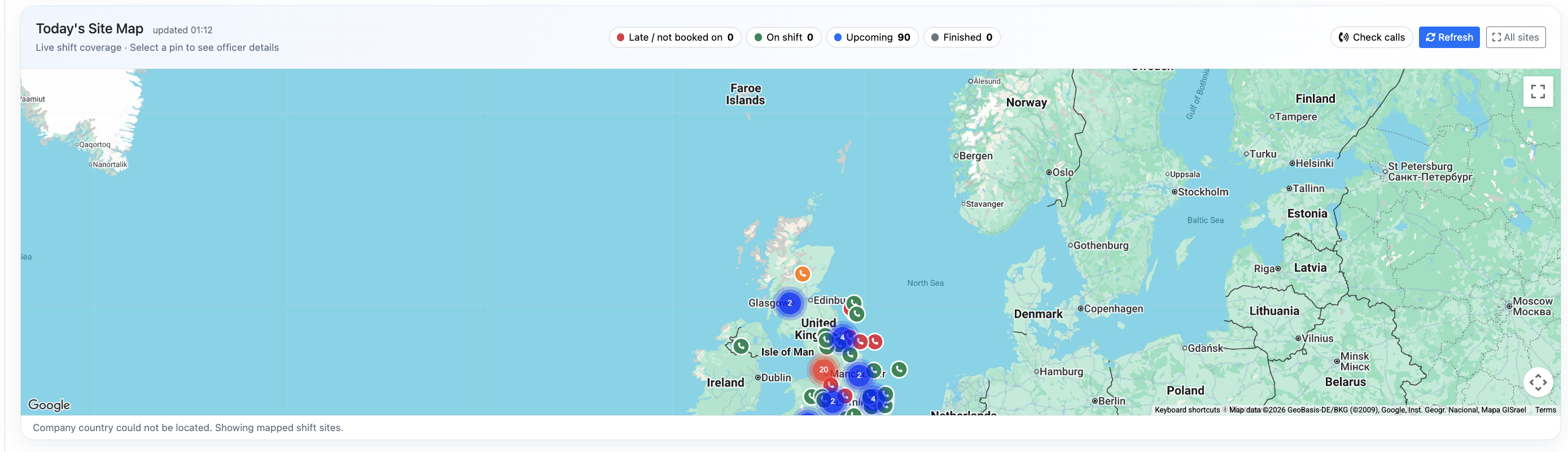
  • Select any pin to see the officer details.
  • Nearby sites cluster, then open up as you zoom in.
  • Run check calls and refresh without leaving the map.
See the dashboard
Late / not booked on Missed starts flagged at once.
On shift Officers confirmed on site.
Upcoming Shifts still to start today.
Finished Shifts completed today.
MonitorGuard Today's Site Map showing live shift coverage with late, on shift, upcoming and finished counts and colour-coded site pins Live status counts Pins by shift status Check calls
Time & Attendance

Every shift, on the record.

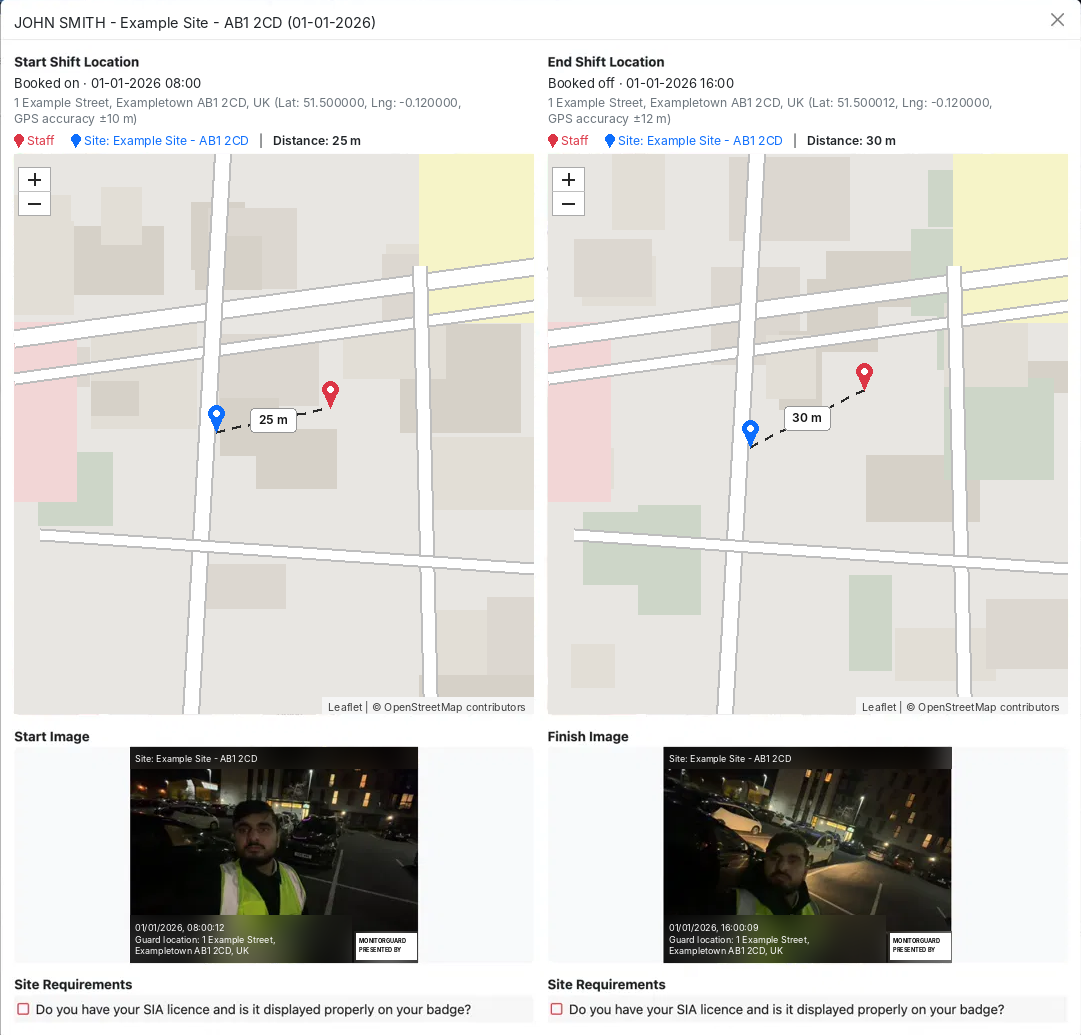
MonitorGuard turns each clock-in into evidence you can show a client: where your guard was, who they were and when it happened. No timesheets to chase and no disputes to untangle.

  1. 1

    Arrive and book on

    The geo-fence only lets staff book on when they are physically on site.

  2. 2

    Prove who and where

    A selfie is stamped with the date, time, site name and location, alongside GPS coordinates and accuracy.

  3. 3

    Confirm the site checks

    Staff answer your site requirements, such as having an SIA licence displayed on their badge.

  4. 4

    Book off with a full record

    The finish location, distance from site in metres and a second selfie complete the shift log.
See it in action Runs in the browser. No app, no NFC tags.
MonitorGuard shift review showing start and end location maps, distance from site, selfie verification and site requirements GPS location and accuracy Distance from site Stamped selfie
Support & Security

Backed by people. Protected by design.

Your data stays safe, access stays in your control, the system stays online and a real person is always there when you need a hand.

Before & after

Managed using MonitorGuard

How security, cleaning and facilities teams swapped spreadsheets, tags and paperwork for one platform.

Sarah Johnson

Operations Manager, Security Guarding

Win more work
Before

Coverage we could not prove to prospects, run from spreadsheets and scattered WhatsApp messages.

After

GPS-verified shifts and live visibility we can show to every prospect.

43% Sales growth from evidencing service deliveryProof of coverage gives prospects the confidence to sign.

“We used to tell prospects our coverage was reliable. Now we show them. GPS-verified shifts and live visibility have made tenders far easier to win.”

Scheduling GPS Time Clock Live Visibility

David Conway

Control Room Lead, Multi-Site Security

Meet client KPIs
Before

Slow updates and limited visibility across sites made KPI reporting manual.

After

Real-time incident reporting and supervisor updates, with every record in one place.

96% Client KPIs metIncident and supervisor records provide the evidence behind every KPI.

“The incident reporting and supervisor updates are a game-changer. We get real-time visibility, faster escalation and cleaner client reporting, so we can evidence our KPIs with confidence.”

Incidents Client Reports Comms

Emily Simmonds

Contracts Supervisor, Cleaning Services

Invoice faster
Before

Paper checklists, timesheet disputes and delayed invoicing.

After

Digital checklists, photo proof and automatic timesheets that feed straight into invoices.

72% Faster invoice turnaroundInvoices are built from approved, automatic timesheets.

“We manage cleaners across multiple sites. MonitorGuard gives us digital checklists, photo proof and automatic timesheets. Disputes dropped, invoicing is quicker and standards are consistent.”

Task Checklists Timesheets Quality Control

Charlotte Summer

FM Division Company Managing Multi-sites

One platform
Before

Separate tools and apps for security, cleaning and engineering teams.

After

One Web App in the browser for every team on site, with nothing to download.

5 FM services on one platformSecurity, cleaning, engineering, concierge and fire watch teams all use the same system.

“Our guards don’t need a mobile app any more. They open the MonitorGuard Web App in their phone’s browser, and the same link works for our cleaners, engineers and concierge.”

Web App No Download All FM Services
See How MonitorGuard Fits Your Operation

Book a Personalised Demo

Tell us what you want to improve and we will tailor the demo around your operational priorities.

What to expect

A demo built around your business

We focus on the areas most relevant to your security, cleaning or facilities management operation.

Choose a suitable time

Tell us the date and time that works best for your team.

Focus on your goals

Tell us what you want to improve so we can tailor the session.

Bring your operations team

Invite managers, schedulers or decision-makers.

Email sales@monitorguard.co.uk
Availability Mon-Fri, 9:00 AM - 6:00 PM
Demo Request

Tell us what you would like to achieve

The more context you provide, the more relevant we can make your MonitorGuard demonstration.

Include your preferred demo date/time and the outcome you want to achieve.